
Software Deactivation
Deactivating the software frees up your licence so it can be used on another computer. Once deactivated, you will no longer be able to run the software on the current machine unless it is reactivated.
Accessing the Deactivation Screen
1. Launch the software.
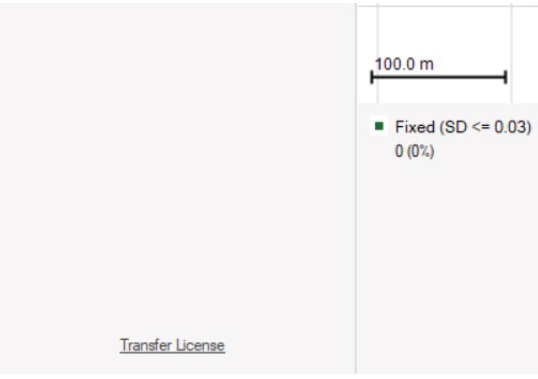
2. In the bottom-left corner, click the Transfer Licence link.
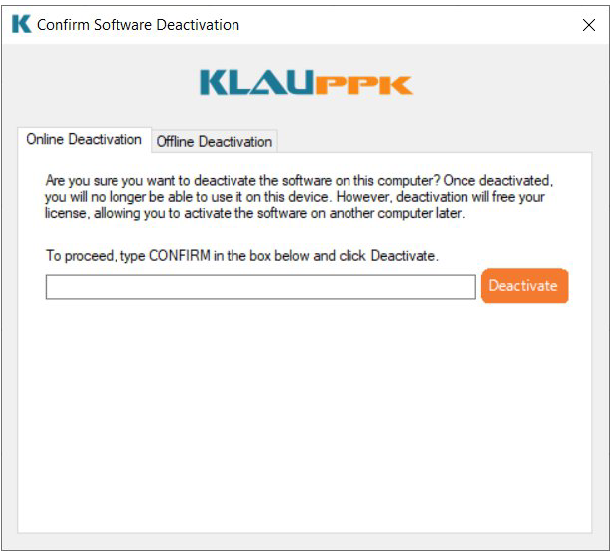
3. The Confirm Deactivation form will appear.
4. The deactivation screen is also accessible from the Help Centre
Online Deactivation (Recommended)
Online deactivation is the fastest and most convenient method.
1. In the deactivation form, enter the word CONFIRM into the text box.
2. Click Deactivate.
3. If successful, a confirmation message will appear and the software will be deactivated immediately.
Offline Deactivation
If your computer is not connected to the internet:
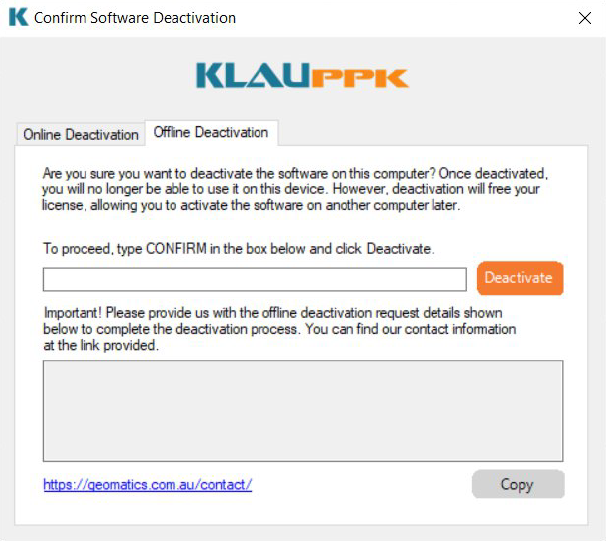
1. Navigate to the Offline Deactivation tab (if not already selected).
2. Type CONFIRM into the text box and click Deactivate.
3. A unique Offline Deactivation Request code will be generated.
4. Copy and email this code to our team(contact details are listed at the bottom of the activation screen).
5. We will process your request and confirm deactivation from our end.
Process your next flight with KlauPPK
Start a 14 day, full-function trial and test KlauPPK with your own project data. No credit card required.